Evaluating the Creative Promotion Social Media Post Template
In the fast-paced ecosystem of digital marketing, visual consistency is not merely an aesthetic preference; it is a fundamental component of brand recognition. For professionals ranging from freelance graphic designers to small business owners managing their own social presence, the pressure to produce high-quality content daily can be overwhelming. This is where structured design assets become invaluable. The Creative Promotion Social Media Post Template represents a specific category of digital resource designed to streamline this workflow. By offering a pre-configured layout with modern typographic and color standards, it aims to reduce production time while maintaining professional output quality.
This analysis explores the practical utility of this template, focusing on its technical specifications, design flexibility, and suitability for various professional contexts. Rather than viewing it as a simple shortcut, we examine it as a tool for establishing visual reliability in a crowded digital space.
Technical Specifications and Design Integrity
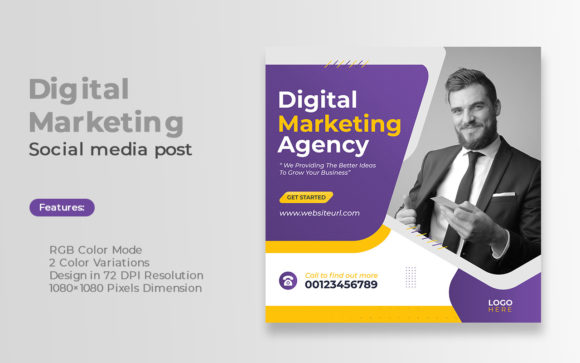
The foundation of any usable digital asset lies in its technical construction. This template is built with a resolution of 72 DPI and dimensions of 1080×1080 pixels. These specifications are the industry standard for square-format social media posts, particularly on platforms like Instagram, Facebook, and LinkedIn. While 72 DPI is sufficient for screen display, it is important to note that this format is not suitable for high-resolution print materials. Users intending to repurpose these designs for physical brochures or posters would need to recreate the layout at a higher resolution, typically 300 DPI.
The file is delivered in EPS (Encapsulated PostScript) format. This is a significant advantage for users who rely on vector-based software such as Adobe Illustrator. Unlike raster formats (like JPEG or PNG), EPS files allow for infinite scalability without loss of quality. This means that elements within the design—such as logos, icons, or text boxes—can be resized, rotated, or manipulated without becoming pixelated. For designers who need to adapt the square post into a story format (1080×1920) or a banner, the vector nature of the EPS file provides the necessary flexibility.
Furthermore, the template utilizes RGB Color Mode. This is critical for digital accuracy. Screens emit light, and RGB (Red, Green, Blue) is the color model that monitors and mobile devices use to display images. Designing in RGB ensures that the colors seen during the editing process closely match what the audience sees on their feeds. A common mistake among novice designers is creating social media graphics in CMYK (used for print), which often results in dull or shifted colors when uploaded online. This template’s native RGB setup eliminates that risk.
Customization and Typographic Consistency
One of the most compelling features of this asset is its reliance on Montserrat, a free, open-source font family. Montserrat has gained immense popularity in modern web and graphic design due to its geometric sans-serif structure, which offers excellent readability across various screen sizes. By using a widely available font, the template ensures that users do not need to purchase expensive licenses or hunt for obscure typefaces. If a user does not have Montserrat installed, it can be downloaded freely from Google Fonts, ensuring long-term accessibility and consistency.
The template offers two color variations. This duality allows brands to maintain visual interest without deviating from their core identity. For instance, a company might use one variation for educational content and the other for promotional offers, creating a subtle visual cue for the audience. However, the true value lies in the fact that the design is fully editable and customizable. Users are not locked into the default colors. Because the file is vector-based, changing the color palette to match specific brand guidelines is a straightforward process. This adaptability is crucial for agencies managing multiple clients or entrepreneurs rebranding their businesses.
It is important to clarify a key limitation: the image is not included. The template provides the structural framework—the text placeholders, background shapes, and graphical accents—but the central photographic or illustrative element must be supplied by the user. This is standard practice for professional templates, as stock imagery choices are highly subjective and context-dependent. This requirement encourages users to select high-quality, relevant images that align with their specific message, rather than relying on generic placeholder graphics that may dilute the brand’s authenticity.
Practical Application and Workflow Efficiency
For marketers and content creators, time is a finite resource. The primary benefit of the Creative Promotion Social Media Post Template is the reduction of "blank canvas syndrome." Starting a design from scratch requires decisions about hierarchy, spacing, alignment, and color balance. This template has already solved those foundational design problems. A user can import their image, update the text, adjust the colors, and export the final file in a fraction of the time it would take to build a comparable layout manually.
Consider a small business owner launching a new product. Instead of spending hours experimenting with layout options, they can utilize this template to create a cohesive series of posts. By keeping the layout consistent and only changing the product image and headline, they create a recognizable visual pattern on their feed. This consistency helps in building brand recall. When followers scroll through their feeds, they begin to associate that specific layout structure with the brand, increasing the likelihood of engagement.
Freelancers and agencies also benefit significantly. When handling multiple clients, having a library of reliable, editable templates allows for faster turnaround times. The EPS format ensures that if a client requests a last-minute change to the logo size or color scheme, the designer can make these adjustments quickly without compromising the design’s integrity. This efficiency translates directly into better profit margins for service providers and faster campaign launches for businesses.
Target Audience and Strategic Fit
Who stands to gain the most from this resource? The utility of this template extends across several professional profiles:
- Small Business Owners: Those who manage their own marketing but lack advanced design skills. The template provides a professional veneer that might otherwise require hiring a designer.
- Social Media Managers: Professionals responsible for high-volume content creation. The template serves as a reliable base for daily posts, ensuring brand consistency across hundreds of images.
- Freelance Designers: Creatives who need to speed up their workflow for lower-budget clients. It allows them to deliver polished results quickly while focusing their creative energy on custom imagery.
- Educators and Publishers: Individuals who need to promote courses, webinars, or articles. The clear typographic hierarchy of the Montserrat font makes it ideal for conveying information clearly.
However, it is essential to recognize where this template may not fit. Brands with highly complex, bespoke visual identities that require unique illustrations or unconventional layouts may find the structure too rigid. Additionally, users who do not have access to vector editing software (like Adobe Illustrator or CorelDRAW) will face a steep learning curve or may need to convert the file, which could compromise its editability. For those strictly using Canva or Photoshop, an EPS file may require conversion steps that negate some of the time-saving benefits.
Long-Term Value and Limitations
When evaluating the long-term value of the Creative Promotion Social Media Post Template, one must consider the evolving nature of social media trends. While square posts remain a staple, vertical video and story formats are gaining dominance. The vector nature of the EPS file mitigates this concern somewhat, as the elements can be rearranged for different aspect ratios. However, users should view this template as part of a broader design system, not a standalone solution for all content needs.
The reliance on free fonts and standard resolutions ensures that the template remains accessible and compatible with most digital workflows. There are no recurring subscription fees for fonts or plugins, which adds to its cost-effectiveness. Yet, the responsibility for quality control remains with the user. A template cannot compensate for poor photography or unclear copy. The effectiveness of the final post depends heavily on the quality of the image inserted and the relevance of the message conveyed.
In conclusion, this template is a pragmatic tool for enhancing visual consistency and operational efficiency. It is best suited for professionals who understand the basics of vector editing and seek to standardize their social media presence without sacrificing customization. By providing a solid structural foundation, it allows creators to focus on what truly matters: compelling content and strategic engagement.