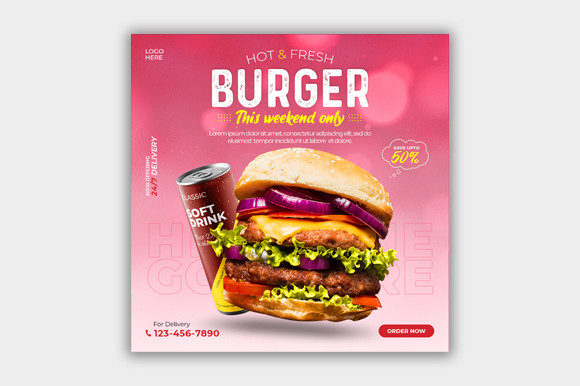
Maximizing Visual Impact with a Clean Food Social Media Banner Template
In the saturated landscape of digital marketing, visual consistency is often the differentiator between a scrolling user and an engaged customer. For restaurants, food bloggers, and culinary brands, the pressure to produce high-quality graphics daily can be overwhelming. This is where a specialized Food Social Media Banner Template becomes an essential asset rather than a mere convenience. Designed to streamline the creative process, these templates offer a structured foundation that balances aesthetic appeal with functional clarity.
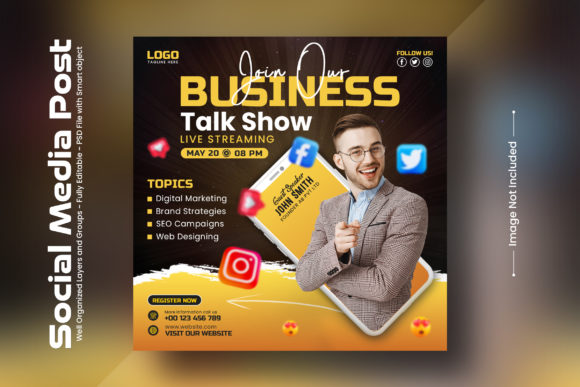
A clean and modern social media banner template serves as a versatile tool for promoting business offerings, from daily specials to brand storytelling. Unlike generic design tools that require starting from scratch, a pre-built PSD (Photoshop Document) file provides a professional framework. The key distinction lies in its editability; all main elements are customizable, allowing users to swap images via smart objects, adjust typography, and modify color schemes without disrupting the overall composition. This article explores the practical value of such templates, comparing them against alternative design approaches to help you determine if this resource fits your operational needs.
Understanding the Structure and Utility of PSD Templates
At its core, a Food Social Media Banner Template is a layered digital file, typically created in Adobe Photoshop, optimized for square formats such as 1080 px x 1080 px. This dimension is the industry standard for Instagram posts and Facebook updates, ensuring high resolution across devices. The technical backbone of these templates relies on "Smart Objects," a feature that allows users to replace placeholder images with their own photography while maintaining perspective, lighting effects, and shadows automatically.
The utility of this format extends beyond simple image replacement. A fully layered PSD file means that every text box, icon, and background element exists on its own layer. This granularity is crucial for businesses that need to maintain brand consistency. For instance, a cafe might use the same layout for a Monday morning coffee promotion and a Friday evening pastry special, changing only the product photo and the descriptive text. The underlying design structure remains intact, preserving the visual identity of the brand.
Furthermore, the use of free fonts in these templates removes a significant barrier to entry. Many premium designs require specific paid typography licenses, which can complicate usage for small businesses. By utilizing freely available fonts, the template ensures that any user can open the file and begin editing immediately, without worrying about missing typefaces or additional costs.
Comparing Template-Based Design vs. Custom Creation
When evaluating design resources, it is helpful to compare template-based solutions against custom design services and DIY graphic design platforms. Each approach has distinct tradeoffs regarding time, cost, and creative control.
- Custom Design Services: Hiring a professional graphic designer offers unique, bespoke visuals tailored specifically to your brand’s nuanced identity. However, this option is costly and time-consuming. It is best suited for major campaign launches or rebranding efforts rather than daily social media updates.
- DIY Graphic Design Platforms: Web-based tools offer drag-and-drop simplicity and vast libraries of assets. While accessible, they often lack the fine-tuned control over lighting, shadow, and texture that a PSD file provides. Additionally, relying on web platforms can lead to generic-looking outputs if many users select the same popular templates.
- PSD Templates: A Food Social Media Banner Template strikes a balance between these extremes. It offers the high-fidelity quality of professional design with the flexibility of self-editing. The learning curve is steeper than web-based apps but significantly lower than creating original artwork from scratch.
For businesses that already possess basic Photoshop skills or have access to a junior designer, the PSD template offers superior long-term value. It allows for infinite variations within a consistent style, whereas web-based tools may restrict customization to predefined constraints.
Evaluating Fit: When This Template Is the Right Choice
Determining whether a clean and modern social media banner template is the right fit requires an honest assessment of your internal resources and content strategy. This solution is ideal for entities that prioritize efficiency without sacrificing visual quality.
Best-Fit Scenarios:
- High-Volume Content Needs: If your strategy involves posting multiple times per week, having a reusable template drastically reduces production time. You can batch-create content for the month in a single session.
- Established Brand Guidelines: Businesses with specific color palettes and font preferences benefit from templates that allow precise RGB color mode adjustments. The ability to tweak every element ensures alignment with corporate standards.
- Product-Centric Marketing: Since the template focuses on imagery via smart objects, it is particularly effective for showcasing food items. High-quality photography takes center stage, framed by clean, unobtrusive design elements.
Conversely, this template may not be suitable if your brand relies heavily on illustration, complex animations, or video content. PSD files are static; if your social media strategy leans toward Reels or TikToks, you will need complementary video editing resources. Additionally, if you have zero familiarity with Adobe Photoshop, the initial learning investment might outweigh the benefits compared to simpler drag-and-drop alternatives.
Technical Considerations and Limitations
While versatile, it is important to acknowledge the limitations of any static template. The specified format is 1080 px x 1080 px, which is perfect for square feeds but does not account for vertical stories (9:16) or horizontal banners (16:9). Users must be aware that repurposing the design for other aspect ratios will require manual adjustment of layers, which can be time-consuming if not planned correctly.
Another consideration is the reliance on local software. Unlike cloud-based design tools, a PSD file requires Adobe Photoshop to edit. This creates a dependency on specific hardware and software subscriptions. For teams distributed across different locations, ensuring everyone has access to compatible software versions is a logistical factor to manage.
Moreover, the quality of the final output is heavily dependent on the source images. The template provides the structure, but the visual impact relies on the user’s photography. Poorly lit or low-resolution food photos will diminish the effectiveness of even the most polished design. Therefore, investing in basic food photography skills or equipment is often a necessary companion to using high-end templates.
Making an Informed Decision
Choosing the right design resource is a strategic decision that impacts both your workflow and your brand perception. A Food Social Media Banner Template is not a magic solution, but it is a powerful tool when used correctly. It empowers users to maintain a professional appearance consistently, reducing the cognitive load associated with daily content creation.
Before purchasing or downloading, consider your team’s technical proficiency. If you are comfortable navigating layers and smart objects in Photoshop, this template offers a high degree of control and customization. If you prefer speed and simplicity above all else, a web-based platform might serve you better, albeit with less unique styling.
Ultimately, the goal is to find a balance between effort and impact. For many food businesses, the ability to quickly update a proven design with new seasonal items or promotions provides the agility needed in a fast-paced market. By leveraging a fully layered, editable PSD file, you invest in a system that scales with your content needs, ensuring that your visual presence remains clean, modern, and engaging.
If you decide this approach aligns with your workflow, remember that support is often available. Many creators offer assistance via their profiles for customization issues, adding an extra layer of security to your purchase. Additionally, providing feedback or ratings helps the community identify high-quality resources, fostering a better ecosystem for digital assets. Whether you are a solo entrepreneur or part of a larger corporate team, integrating a reliable template into your design toolkit can streamline operations and enhance your visual storytelling.