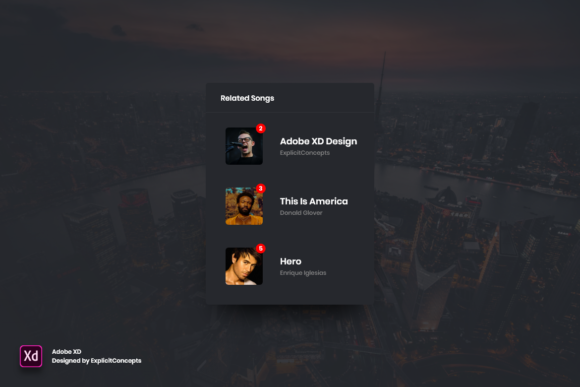
Related Songs Widget for Adobe XD
Designing a music streaming interface requires more than just placing album art and play buttons on a screen. It demands an intuitive flow that keeps listeners engaged, encouraging them to explore deeper into a library. The Related Songs Widget - Adobe XD serves as a crucial component in this ecosystem, offering a pre-built, highly organized solution for designers who need to visualize song recommendations efficiently. Whether you are prototyping a new mobile app or refining a desktop web player, this widget provides a solid foundation for displaying contextual content without starting from scratch.
This resource is not merely a collection of shapes; it is a structured design asset built with clarity and flexibility in mind. By understanding its features and potential applications, various professionals can determine how it fits into their specific workflows, saving time while maintaining high visual standards.
Understanding the Structure and Quality
At its core, the Related Songs Widget - Adobe XD is a UI kit component designed to display a list of songs related to the current track being played. What sets this particular asset apart is its meticulous organization. Every element is housed in clearly named layers, a detail that might seem minor but significantly impacts workflow efficiency. For designers who have ever struggled with a file labeled "Rectangle 43 copy," the value of clear naming conventions cannot be overstated.
The widget is delivered in the native Adobe XD format, ensuring full compatibility with the software’s powerful prototyping and editing tools. It boasts a high quality of 72 dpi, which is the standard resolution for digital screens, ensuring that graphics appear crisp on monitors and mobile devices without unnecessary file bloat. Because every aspect is fully editable, users can modify texts, fonts, colors, and layout structures with ease. This level of accessibility means that the widget is not a rigid template but a flexible starting point that adapts to diverse brand identities.
Why Different Audiences Value This Asset
The utility of a design widget varies significantly depending on who is using it. A freelancer racing against a deadline has different priorities than an educator teaching interface design principles. Here is how different groups might evaluate and utilize the Related Songs Widget - Adobe XD.
For Professional UI/UX Designers
Experienced designers often face the challenge of balancing creativity with efficiency. While they possess the skills to create complex components from scratch, doing so for every project is inefficient. For these professionals, the primary benefit of this widget is speed and consistency. The well-organized layers allow for rapid customization. If a client requires a dark mode interface, the designer can quickly adjust the color palette. If the typography needs to match a specific brand guide, the text fields are easily accessible.
Moreover, the reliability of the structure ensures that when the design is handed off to developers, the specifications are clear. The logical layer hierarchy reduces ambiguity, facilitating smoother collaboration between design and engineering teams. For a professional, this widget represents a tool that maintains high standards while reducing repetitive labor.
For Beginners and Students
Those new to Adobe XD or interface design often struggle with file organization. They may know how to draw a rectangle, but understanding how to structure a complex component for scalability is a learned skill. The Related Songs Widget - Adobe XD serves as an excellent educational resource. By dissecting the file, beginners can observe how experienced designers group elements, name layers, and set up constraints.
For students, this asset offers a safe environment to experiment. They can change fonts, move elements, and break things without the pressure of creating a production-ready product from zero. It provides a tangible example of best practices, helping them build confidence and technical proficiency faster than trial and error alone would allow.
For Entrepreneurs and Small Business Owners
Startup founders and small business owners often wear multiple hats, including product management and basic design. When building a minimum viable product (MVP), budget and time are critical constraints. Hiring a dedicated design team for every micro-interaction may not be feasible. In this context, a ready-to-use widget like this offers significant commercial value.
It allows entrepreneurs to create polished prototypes for investor pitches or user testing without needing advanced design skills. The ease of use means they can tweak the content to reflect their specific music catalog or branding, presenting a professional appearance that instills confidence in stakeholders. For this audience, the widget is a cost-effective solution that bridges the gap between concept and presentation.
For Educators and Content Creators
Educators teaching digital design or marketing courses can use this widget as a case study in their curriculum. It provides a concrete example of how to organize digital assets for team environments. Similarly, content creators who produce tutorials on Adobe XD can use this file to demonstrate editing techniques, such as changing global colors or modifying component states.
By having a high-quality, well-structured file, educators can focus on teaching concepts rather than spending class time building basic elements. It enhances the learning experience by providing students with professional-grade materials to work with, thereby increasing the perceived value of the educational content.
Practical Applications and Customization
The versatility of the Related Songs Widget - Adobe XD lies in its adaptability. Consider a blogger launching a podcast platform. They might use this widget to suggest previous episodes based on the current topic. By simply swapping album art for episode cover images and adjusting the text fields, the same structural logic applies. The clear layer names make it simple to identify which text block controls the song title versus the artist name, allowing for quick repurposing.
For a marketer designing a promotional landing page for a new artist release, the widget can be modified to highlight similar artists. The ability to easily move or remove elements means that if the marketing strategy shifts from a list view to a grid view, the underlying components can be rearranged without rebuilding the entire section. This flexibility supports iterative design processes, where feedback leads to frequent changes.
Freelancers working with multiple clients appreciate the neutrality of the design. Since it is easy to edit fonts and colors, the widget can be white-labeled to match any client’s brand identity. One day it might feature bold, vibrant colors for a youth-oriented music app; the next, it could be stripped back to minimalist black and white for a classical music archive. This adaptability increases the long-term usefulness of the asset, making it a recurring tool in a freelancer’s toolkit.
Evaluating Fit for Your Project
Before integrating this widget into your workflow, consider your specific goals. If you prioritize absolute creative freedom and unique, unconventional layouts, a pre-built widget might feel restrictive. However, if you value reliability, speed, and industry-standard organization, this asset aligns well with your needs.
Ask yourself: Do I need to spend time structuring layers, or do I want to focus on high-level design decisions? For most projects, especially those with tight deadlines, the latter is true. The Related Songs Widget - Adobe XD removes the friction of setup, allowing you to concentrate on user experience and visual polish. It is particularly suitable for projects where consistency and clarity are paramount, such as enterprise applications or established brands undergoing a refresh.
Ultimately, the decision to use this widget depends on your balance of time, skill, and project requirements. For beginners, it is a learning aid; for professionals, a time-saver; and for business owners, a cost-efficient prototype tool. By leveraging its organized structure and editability, you can enhance your design process regardless of your background or objectives.