Evaluating Pricing Table Vol 01 for Adobe XD
In the competitive landscape of web and application design, presenting cost structures clearly is just as important as the services themselves. A well-designed pricing table can significantly influence user conversion rates by reducing cognitive load and facilitating quick comparisons. For designers working within the Adobe ecosystem, Pricing Table Vol 01 - Adobe XD offers a pre-built solution aimed at streamlining this specific aspect of interface design. This article explores the features, utility, and practical considerations of this resource to help you determine if it aligns with your current project requirements.
Understanding the Resource
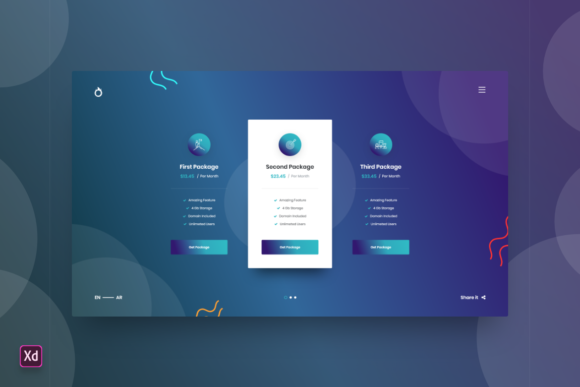
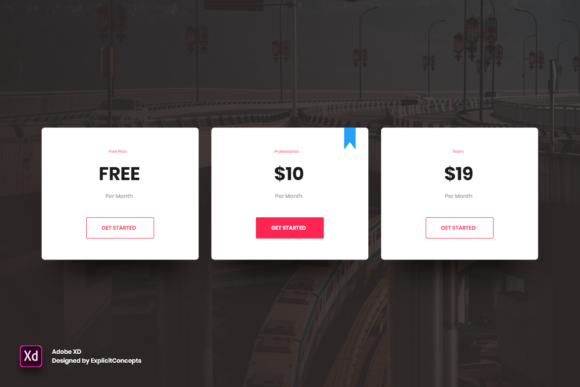
Pricing Table Vol 01 - Adobe XD is a digital asset designed specifically for use in Adobe XD, a vector-based user experience design tool. Unlike generic image templates or rigid code snippets, this resource provides a fully editable source file. The core value proposition lies in its structure: every element is well-organized into layers with clear, descriptive names. This organizational strategy is critical for professional workflows, where time spent searching for unnamed layers can accumulate into significant inefficiencies.
The file is delivered in a high-quality 72 dpi format, which is the standard resolution for screen-based designs. It is ready to use immediately upon download, requiring no complex installation processes or plugin dependencies beyond the Adobe XD software itself. The primary intent behind this product is to provide a foundational layout that designers can customize rather than building a pricing component from scratch.
Key Features and Usability
When evaluating design assets, ease of customization is often the deciding factor. Pricing Table Vol 01 - Adobe XD emphasizes flexibility. Users can easily edit texts, adjust fonts, modify colors, and move or remove elements without breaking the underlying structure. This level of control is essential for maintaining brand consistency across different projects.
- Layer Organization: All components are separated into logical groups. Clear naming conventions allow designers to locate specific buttons, text fields, or background shapes instantly.
- Full Editability: There are no locked elements or flattened images. Every vector shape and text box is accessible, allowing for precise adjustments to spacing, typography, and color palettes.
- Standard Resolution: At 72 dpi, the file is optimized for web and mobile interfaces, ensuring that exports remain lightweight and performant.
- Adobe XD Native Format: Being native to Adobe XD ensures compatibility with other XD features such as repeat grids, component states, and auto-animate prototypes.
Benefits for Design Workflows
The primary benefit of integrating Pricing Table Vol 01 - Adobe XD into your workflow is time efficiency. Designing a pricing table involves more than just placing boxes on a canvas; it requires careful consideration of hierarchy, alignment, and visual balance. By starting with a pre-validated layout, designers can bypass the initial structural phase and focus immediately on customization and content integration.
Furthermore, the clean layer structure supports collaboration. In team environments, handoffs between designers and developers are smoother when files are organized logically. Clear layer names reduce ambiguity, making it easier for developers to interpret design intent when translating the XD file into HTML/CSS or other frontend frameworks.
Another advantage is consistency. Using a standardized template helps ensure that pricing pages maintain a professional appearance. For agencies handling multiple clients, having a reliable base template allows for rapid prototyping while still delivering unique, branded results through color and typography changes.
Tradeoffs and Considerations
While pre-made templates offer convenience, they also come with inherent tradeoffs. One consideration is the potential for generic aesthetics. Since Pricing Table Vol 01 - Adobe XD is available to multiple users, there is a risk that your design may resemble others if significant customization is not applied. To mitigate this, designers should treat the template as a structural skeleton rather than a final visual product. Aggressive modification of colors, fonts, and spacing is necessary to achieve a distinct brand identity.
Additionally, the file is restricted to the Adobe XD ecosystem. If your team primarily uses Figma, Sketch, or direct code-based development, this asset will require conversion or may be incompatible altogether. While Adobe XD files can sometimes be imported into other tools, the fidelity of layers and components may not always transfer perfectly, potentially negating the time-saving benefits.
It is also important to note that this is a static design asset. It does not include responsive behavior logic or interactive code. Designers must still account for how the table will adapt to different screen sizes during the prototyping or development phases. The template provides the visual design, but the responsive implementation remains the responsibility of the design and development team.
Ideal Use Cases
This resource is a strong fit for several specific scenarios:
- Rapid Prototyping: Startups and product teams needing to validate pricing models quickly can use this template to create realistic mockups for user testing without investing days in custom design.
- Freelance Designers: Independent contractors managing tight deadlines can leverage the template to deliver high-quality visuals efficiently, allowing them to allocate more time to client communication and other project aspects.
- Junior Designers: Those still developing their eye for layout and hierarchy can study the structure of Pricing Table Vol 01 - Adobe XD to understand best practices in spacing, alignment, and visual weight distribution.
- Agency Production: Large agencies with high volume output can use this as a internal standard for pricing pages, ensuring a baseline quality across diverse client projects.
When to Consider Alternatives
There are situations where Pricing Table Vol 01 - Adobe XD may not be the optimal choice. If your project requires highly complex, non-standard pricing models—such as dynamic calculators, tiered usage-based graphs, or interactive comparison tools—a static template may be too limiting. In these cases, designing a custom component from scratch or using a specialized UI kit with advanced interactive components might be more appropriate.
Furthermore, if your workflow is strictly code-first, you might prefer a CSS framework component or a React library. While design tools bridge the gap between concept and code, they do not replace the need for robust frontend development. If your team lacks Adobe XD licenses or expertise, investing in a template for this specific platform may introduce unnecessary friction.
Making the Decision
Choosing whether to utilize Pricing Table Vol 01 - Adobe XD depends on your specific constraints and goals. Ask yourself the following questions:
- Do I need to speed up the initial design phase?
- Am I comfortable working within Adobe XD?
- Is my pricing structure standard enough to fit a pre-defined layout?
- Do I have the design skills to customize the template sufficiently to match my brand?
If the answer to these questions is yes, this template can serve as a valuable asset in your design toolkit. It offers a balanced combination of structure and flexibility, allowing for efficient creation of professional pricing interfaces. However, always remember that the true value of any template lies in how effectively it is adapted to meet the unique needs of your users and brand.
In conclusion, Pricing Table Vol 01 - Adobe XD is a practical resource for designers seeking to optimize their workflow without sacrificing quality. By understanding its features, limitations, and ideal applications, you can make an informed decision about whether it supports your current design objectives. Whether you are building a minimum viable product or refining an existing service page, this tool provides a solid foundation for clear, effective price presentation.